Showing posts with label Vista. Show all posts

Wednesday, November 08, 2006

Vista RTM'd

Yeppie! Vista is locked, loaded and ready to go. Enterprises, here Vista comes!

Now this begs the question, as a consumer should I go get Business Ed. For my desktop? Or should I wait till Jan for the consumer versions: Home Basic, Premium and Ultimate?

Well, Microsoft not just going to hold their breath from now until Jan. There are going to be subtle improvements on the way for sure. The bottom line, it's always worth the wait for quality... Right?

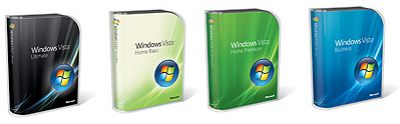
Speaking of quality check out these sweet new boxes:

What's cool in Vista that I like?
1) Organization via search - no more poking around to find your app and docs, just search!
2) Eye candy: Aero (glass), improved Alt-Tab (sticky is a nice feature), 3d-flip (kinda gimmicky), sidebar gadgets
3) More security conscious - reduced access while running software (UAC), IEs security offerings
4) Somewhat faster network access
5) DX10, yet to be seen what kind of awesome games this can help produce

With that said... how many people out there are going to be lining up at Best Buy to get a copy come January??

My guess.... not too many. The feedback i've been getting from the consumer land is that:


1) "...This product has been pegged with delays, and they still don't have it all right.. "
2) "...Microsoft never gets the OS right on the first try, I'm going to wait for SP1 or even SP2..."
3) "...Where are all my drivers? I want to game, use cool hardware, do things i could do on XPSP2, but better!..."

I guess you can't argue with those above points. ISVs (Independent software vendors) and IHVs (Independent hardware vendors) need to catch up and revise their products to be compatibile with Vista.

My take...
Well, my finger print reader software doesn't work, but most of my other peripherals work out of the box. My iPod (Zune isn't out yet so chill), my SD card reader, my webcam and all the little gadgets on my motherboard, all seem to work with Vista. I'm ready for it. I say try it out.

Wikipedia has an entry that describes the new features quite well: [link]

Wednesday, October 11, 2006

Liquid Desktop

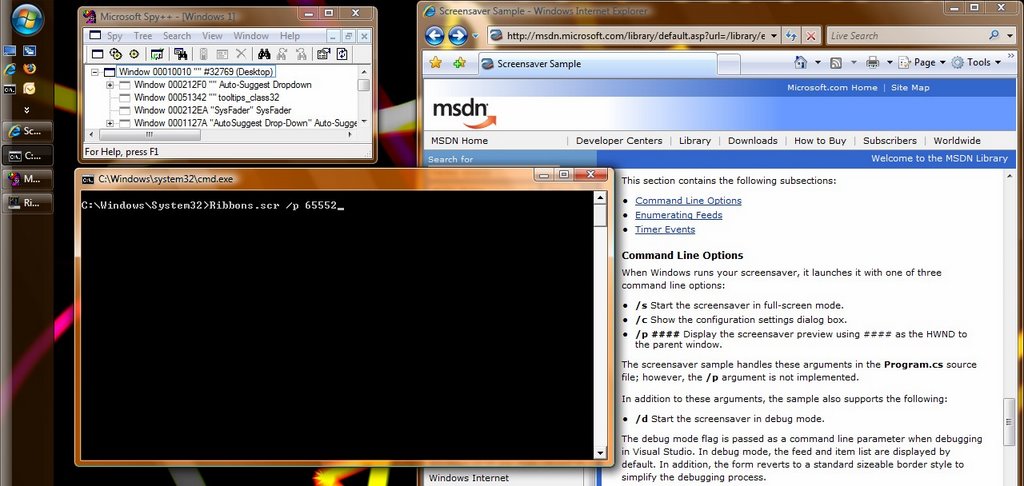
You can do it yourself! Check this out, the parameterization of screensavers allow you to pass in arbitrary HWNDs to parent the screen saver. Meaning.. hmm what if I used the desktop as the parent?

Check this out:


yourfavscreensaverhere.scr /p 65552 and voila, you have an animating desktop!

Sunday, October 08, 2006

UAC & IE7 Toolbar hell


Now with Vista's security, and User Account Control (UAC) are our PCs really much more safe?

I just read this amusing article on how a user experimented with toolbars on IE6. Quite a telling tale: [link].

My bottom-line opinion:
Yes, Windows has created features to make it more difficult to accidentally hose your PC.

However, when it comes down to it.. NO users still need to have a great deal of knowledge to make decisions about whether installing X will be safe. Also whether installing safe X will come with an annoying Y.

User account control is just that - it gives users control to decide when to install something or not, while running in a more restrictive default environment. IOW, I can't accidentally install some foreign ActiveX control that causes spontaneous pop-ups, but I can however still do it, after clicking several dialog boxes.

I would still argue that Windows Vista is probably the most secure version of Windows ever produced. The problem with installing and running software, unfortunately is still a guessing game.

p.s. I'm glad to see a neat reset feature obfuscated in the Internet Options [advanced] Panel.

Reset Internet Explorer settings....

Deletes all temporary files, disable browser add-ons and resets all the changed settings. You should only use this if your browser is in an unstable state.

Sunday, September 24, 2006

Cool features in Windows Vista !! Folder redirection and sync

I'm so-called 'self-hosting' Windows Vista RC1 and I came upon a neat expanded feature, falling under 'Documents management'. Check it out!

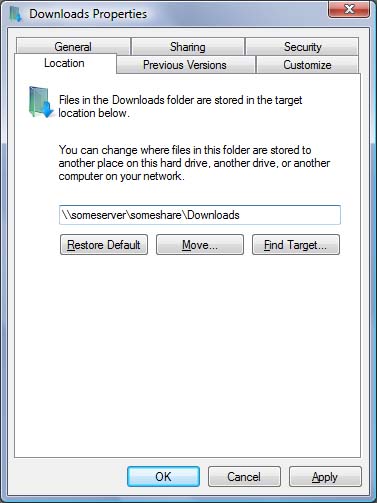
[Location] under the properties of some key special [Explorer] folders like:
Documents, Downloads, Pictures to name a few.

What does this do?! - well not only does it redirect your documents to some arbitrary location, IT ALSO, 'syncs' with a network share if you point the darn thing to a fileshare somewhere, utilizing Windows Sync center. It automatically sets up a partnership with the network share. HOW COOL IS THAT!

Look for the Sync Center sync-up - to know your documents are being replicated.


Screenshot of how to get this all setup.


It's really super easy, just select the location you want to point to, and Windows takes care of the rest. ta da!

Ah, all is not perfect. Even though there is syncing with Explorer and the network share, I suspect there's still lots of traffic between the two when you conduct file i/o on your redirect documents.

Recently, I tried manipulating large RAW (NEF) Nikon images, these things are 10MB 10MP monsters. As a result, you should expect application hangs, delays and worst yet Explorer.exe hangs which may lead to Explorer restarting :(.

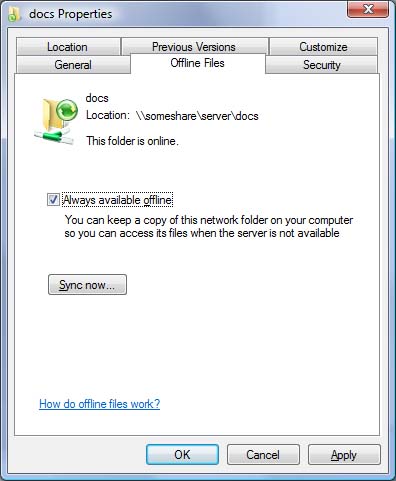
Also, if you so happen _not_ to want to sync with the remote share, but keep everything living remotely and not replicated then you can unselect offline files.

Screenshot

You might find it annoying when sync center has to de-select each individual object from syncing. Ughk! This was quite painful when I pointed it to my music collection.

All in all, a really cool feature. Especially, if you're going to have a network appliance/data server sitting in your closet somewhere to keep your data backed-up in some raid configuration.